


AirScope: Pollen & Air Quality
4.087.00 Reviews
App Specs
- Version
- 2.0.1
- Updated On
- License
- Free
- Downloads
- 10,000+
- Developer
- Ingenio Productions
- Categories
- Weather
- Platform
- Android
Screenshots
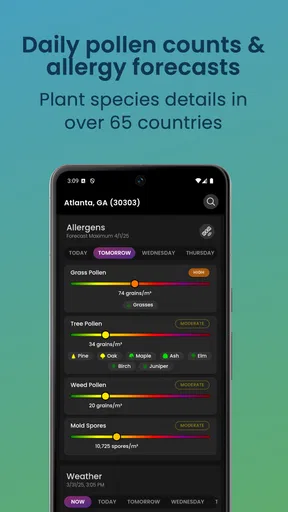
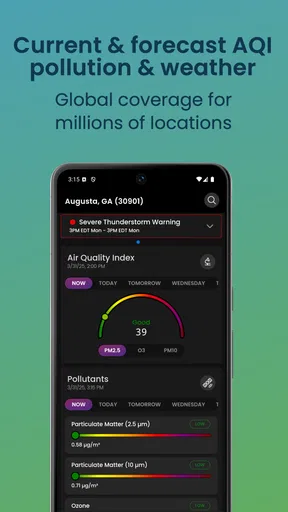
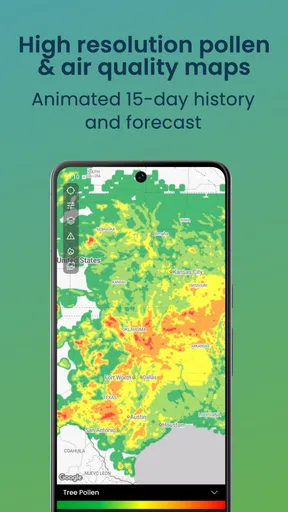
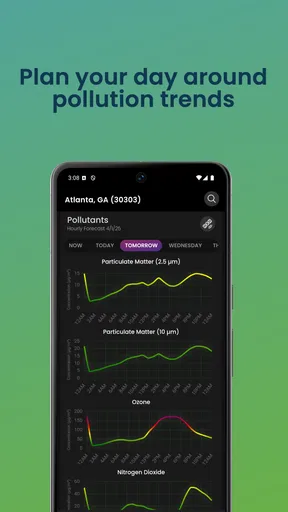
 Analysis by AppCompare
I installed AirScope: Pollen & Air Quality because ordinary weather apps often leave out the information I need most on difficult breathing days. A temperature forecast can tell me whether to take a jacket, but it does not always help me decide whether to run outdoors, open the windows, or postpone a long walk. AirScope takes a more focused approach, combining pollen information, air-quality forecasting, allergy alerts, wildfire smoke mapping, and weather radar in one weather app from Ingenio Productions.
My first impression is that this is not trying to replace every general-purpose weather service. Its value is more specific: it puts environmental conditions that affect comfort and breathing closer to the center of the experience. That makes it especially interesting for people with seasonal allergies, asthma-related concerns, sensitivity to smoke, or a simple desire to understand why an outdoor day feels unpleasant even when the sky looks clear.
It is free to download and available for everyone, with optional in-app purchases ranging from $0.99 to $4.99 per item. The app was released on May 22, 2024, and the current version is 2.0.1, requiring at least iOS or Android version 12. I would not choose it solely because it is free, though. The more important question is whether its specialized environmental information fits the way you make daily plans.
How AirScope feels during quick checks and busy weather moments
I find AirScope most useful when I treat it as a quick planning check, not a screen to monitor constantly. A brief look before leaving can help me decide whether to adjust an outdoor plan, while a second check makes sense if the weather or haze changes. That practical rhythm also makes the first setup feel less daunting: the next step is simply choosing a location and learning which view answers your immediate question.
Fast answers matter more here than a crowded forecast screen
When I open a weather app, I usually want an answer within a few seconds: Is it sensible to go outside now, and what might change later? AirScope is best judged by that kind of quick decision rather than by how many conventional weather details it can display. Its pollen and air-quality focus gives a short check a practical purpose, especially before commuting, exercising, gardening, or taking children to a park.
The useful habit is to check the app at two different points in the day instead of treating the first reading as a permanent verdict. Morning conditions may look acceptable while smoke or pollution becomes more uncomfortable later, and pollen concerns can change with weather patterns. AirScope’s forecast-oriented approach makes it more useful for planning than an app that only reports what is happening at the exact moment you look.
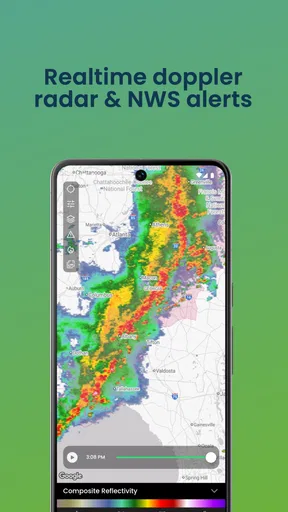
I also like the idea of combining the air-quality view with the weather radar rather than reading either one in isolation. A radar image can explain why a planned outdoor activity may be interrupted by rain, while the air-quality information addresses a different question: whether going outside is comfortable or sensible even if the rain stays away. That combination is one of the app’s more practical strengths.
Worth Reading Before You Choose

Flipboard Shows What News Apps Must Do Beyond the Feed

Switching to Android Auto Means Rethinking Your Driving Routine

Google Calendar Makes a Crowded Week Easier to Manage

Ludo King Makes the Most of the Minutes Between Plans

Baby Panda World Brings Quick Play to Modern Phones, but Its Game Library Feels Busy

ESPN’s Live Game View Makes Following Close Games Easier
The best performance expectation is quick situational awareness, not a full meteorological workstation. If you want a compact environmental check before leaving home, the app has a clear purpose. If you expect detailed long-range weather analysis, extensive customization, or the depth of a specialist forecasting platform, you may find its focused design less complete.
What happens when several tools are used together
The heavier moments are likely to come when I move between the forecast, allergy information, smoke map, and radar instead of looking at one simple reading. That is also when the app becomes most useful. A person planning a long bike ride may first inspect pollen conditions, then check the air-quality outlook, then look at the radar for approaching rain. A traveler driving through a smoky region may care more about the wildfire smoke map than the standard forecast.
This workflow is more demanding than opening a basic weather widget, but it avoids the mental effort of switching between several unrelated apps. In my view, that is the central trade-off: AirScope asks me to spend a little more attention because it brings together environmental factors that general weather apps often treat as secondary.
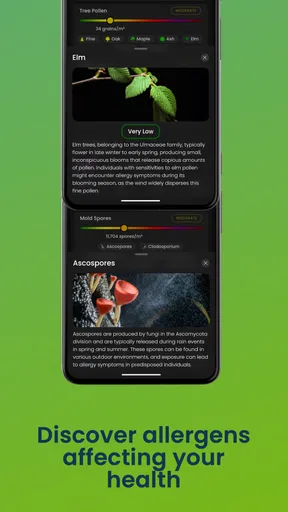
For a realistic everyday example, imagine waking up with irritated eyes during allergy season. Instead of deciding based only on the temperature, I would check the pollen outlook and allergy alert before planning a morning walk. If the pollen situation looks manageable, I would then use the radar to see whether rain is approaching. Later, if the air feels hazy, the wildfire smoke map and air-quality forecast would give me a better reason to shorten the outing or move exercise indoors. This does not make a medical decision for me, but it supports a more informed routine.
That sequence also reveals a small friction point. The app’s value depends on me interpreting several kinds of information together. Someone who wants one universally simple “go outside” answer may find the extra context inconvenient. Environmental conditions are not always reducible to one number, and AirScope is more helpful when I accept that reality rather than expecting a single definitive instruction.
Reliability is about consistency as well as forecast detail
For an app like this, reliability has two sides. The first is whether the information is available when I need it. The second is whether the presentation remains understandable when conditions become complicated, such as during a smoke event or a day with rapidly changing weather. A specialized tool earns trust by helping me compare the current situation with the forecast without making the screen feel confusing.
AirScope’s combination of alerts and maps gives it a useful role in repeated checking. An allergy alert can draw attention to a problem I might otherwise overlook, while the smoke map provides broader context than a local reading alone. I would still treat alerts as prompts to check conditions, not as replacements for personal judgment or professional medical advice. People react differently to pollen and air pollution, and an app cannot know every individual health circumstance.
The app’s public reception suggests a reasonably established early user base, with a 4.0 average from around 281 ratings and roughly 87 written reviews. It has passed 10K+ installs, which is enough to show that the concept has attracted real interest while still making it feel like a relatively young product rather than a universally familiar weather standard.
Because the app was released recently compared with long-running weather services, I would approach it with sensible expectations. A newer specialized app can feel more direct because it concentrates on a narrower problem, but it may not have the same maturity or breadth that people associate with major weather platforms. That does not make AirScope unreliable; it means I would keep a second source available for important travel, severe-weather, or health-related decisions.
Battery, storage, and older-device considerations
AirScope requires a device running version 12 or later, so compatibility is the first practical limitation. Anyone using an older phone or tablet should check the operating-system requirement before planning around it. For supported devices, the main resource question is how often the app is opened and how heavily maps and forecasts are used, rather than the simple act of reading one screen.
Frequent map browsing, repeated radar checks, and regular alert use can naturally demand more from a device than a static weather glance. I would avoid leaving the app open unnecessarily during a long outing and would use it as a check-in tool: inspect the forecast before leaving, revisit it when conditions change, and close it when the decision is made. That workflow keeps the app useful without turning it into a constant background companion.
I also would not assume that installing a weather app means I can ignore the phone’s remaining storage or battery condition. Map-based information is more valuable when the device is ready to load it, and a nearly full or aging phone can make any information-heavy app feel less responsive. AirScope is therefore a better fit for a reasonably current device than for someone trying to extend the life of an old handset that already struggles with modern apps.
Another device-related consideration is screen size. On a larger phone or tablet, a radar or smoke map should be easier to inspect without repeatedly zooming and panning. On a small screen, the same information may require more deliberate interaction. That is not a flaw unique to AirScope, but it matters because the app’s distinctive value depends partly on visual environmental layers rather than only on text.
Where it beats ordinary weather alternatives
The usual weather alternative is a general forecast app that emphasizes temperature, precipitation, wind, and hourly conditions. Those apps remain better for broad daily planning. If I am choosing clothing, checking a commute, or comparing several cities, a familiar general service may be faster and more comprehensive.
AirScope becomes the better choice when the question is environmental exposure. Its pollen count and air-quality forecast, allergy alerts, and wildfire smoke map address concerns that can be buried or absent in a conventional weather interface. I would use a general weather app for the broad forecast and AirScope for the conditions that influence whether outdoor air feels tolerable.
That does not mean I need both apps open every day. Someone without allergies or smoke concerns may gain little from a dedicated environmental view and may prefer the simplicity of a standard weather tool. On the other hand, someone who repeatedly changes plans because of pollen or haze may find that AirScope saves time by putting those checks together. The right choice depends less on how much weather information a person wants and more on which kind of information actually changes their behavior.
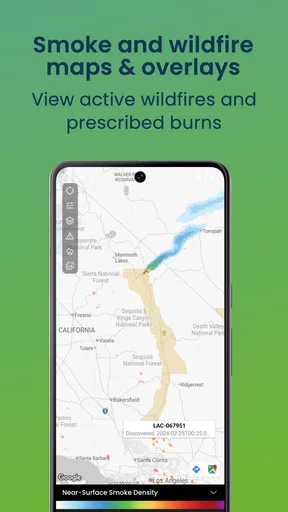
The wildfire smoke map is particularly valuable for people who travel or live in areas affected by seasonal fires. It gives the situation a geographic dimension, which is more useful than seeing an isolated local reading when smoke is moving across a region. Still, I would not use the map as a reason to drive toward or through a hazardous area. Its role is awareness and planning, not permission to take unnecessary risks.
Small workflows that make the app more useful
My preferred workflow is to create a short decision routine rather than browse aimlessly. First, I check the current air-quality and pollen picture. Second, I look at the forecast to see whether the conditions are likely to improve or worsen. Third, I use radar or the smoke map only when the planned activity makes that extra context relevant. This keeps the app from becoming an endless stream of weather layers.
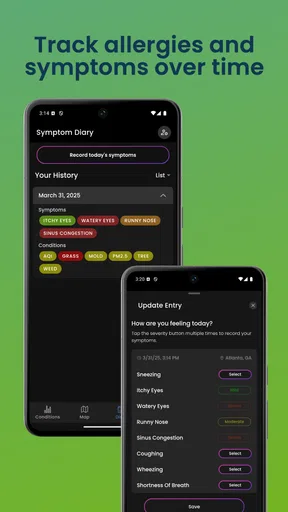
A second useful approach is to compare the alert with how I actually feel. If an allergy alert appears on a day when I already notice symptoms, I treat it as confirmation to reduce exposure, adjust timing, or choose an indoor activity. If I feel fine despite a warning, I still avoid assuming that the warning is meaningless. The point is to combine personal experience with environmental information, not to let either one completely override the other.
A third tip is to use the app before making commitments rather than after leaving. For example, checking before a school pickup, outdoor workout, or gardening session gives me time to change the plan. Opening a smoke map only after arriving at a destination is less useful than examining the regional picture beforehand. AirScope works best when its forecasts and maps are part of planning, not merely an explanation for discomfort that has already happened.
The optional purchases also deserve a practical thought. Since the app is free and the individual purchase range is modest, I would begin with the basic experience and only pay if a specific optional function genuinely improves my routine. I would not buy extras simply because the app is specialized. The value should come from repeated use and better decisions, not from collecting more screens or alerts than I can realistically interpret.
Who should install it, and who should skip it
I would recommend AirScope to people whose daily choices are strongly affected by pollen, smoke, or air quality. It is also a good candidate for parents who plan outdoor activities, runners who need to choose safer training windows, gardeners who react to seasonal allergens, and travelers moving through areas where wildfire smoke can change quickly.
I would be more cautious about recommending it to someone who only wants a basic temperature and rain forecast. That person may find the environmental emphasis unnecessary and may prefer a simpler, established weather app. I would also skip relying on AirScope alone for emergency warnings, serious medical decisions, or high-stakes travel planning. A focused environmental app can support those decisions, but it should not be the only source of information when conditions are dangerous.
The age rating of Everyone makes it broadly approachable, but that does not mean every reading has the same significance for every user. A child, an older adult, and a person with respiratory sensitivity may respond differently to the same conditions. The app can help a household notice patterns, yet adults still need to apply appropriate judgment for the people in their care.
My performance verdict after weighing speed, stability, and usefulness
AirScope feels most convincing when I judge it as a focused environmental companion rather than a universal weather replacement. Its strongest idea is the combination of pollen, air quality, allergy awareness, wildfire smoke, and radar in a single place. That combination can reduce the need to piece together an outdoor plan from several separate services.
Its limitations are equally clear. The specialized information may be more detail than casual users want, map and forecast checking can demand more device attention than a simple widget, and a newer app should not automatically replace a trusted source for serious weather decisions. The minimum operating-system requirement also rules out older devices, while the optional purchases mean the free starting point may not represent every available capability.
Even with those qualifications, I think the app earns a place on the phone of anyone who regularly asks, “Is the air suitable for me today?” rather than only, “Will it rain?” The 4.0 average shows a generally positive reception, and the product’s direction is easy to understand without feeling like a generic forecast clone.
My final recommendation is to try AirScope: Pollen & Air Quality if pollen, smoke, or air quality regularly changes your plans. Use it as a planning layer alongside common sense and, when necessary, official health or emergency guidance. If your weather needs stop at temperature and precipitation, a conventional weather app will probably be quicker and less distracting. For everyone else, especially people who want to make outdoor decisions with more environmental context, this free app from Ingenio Productions is a sensible and genuinely useful option.
Pros
- Clear pollen forecasts help users plan outdoor activities.
- Air-quality data is presented in an easy-to-understand format.
- Useful allergy insights can support daily symptom management.
- Location-based updates make local conditions quick to check.
- Clean interface keeps key environmental information easy to find.
Cons
- Some features may require a paid subscription or in-app purchase.
- Forecast accuracy can vary depending on local monitoring coverage.
- Pollen information may be limited in smaller towns or rural areas.
- Frequent alerts could become distracting without careful customization.
- The app may use location access
- which can affect battery life.
FAQs for AirScope: Pollen & Air Quality
What is AirScope: Pollen & Air Quality used for?
AirScope: Pollen & Air Quality is designed to help you understand the environmental conditions around you before going outside. It combines air-quality information with pollen data, typically presenting readings such as pollution levels, allergen conditions, forecasts, and location-based updates. This can be useful for people with allergies, asthma, respiratory sensitivities, or anyone who wants to plan outdoor activities more comfortably.
Does AirScope provide accurate pollen and air-quality information?
The app’s information depends on the monitoring stations, weather services, pollen models, and regional data sources available for your selected location. Air-quality readings may be based on official sensors, while pollen levels can often be estimated from seasonal and meteorological patterns. Results are helpful for general planning, but they should not be treated as medical advice or as a replacement for official health alerts.
Does AirScope need my location to work?
AirScope can usually provide more relevant results when location access is enabled because it can automatically display conditions for your current area. However, users who prefer not to share their location may be able to search for and save cities manually, depending on the app’s available features. Review the permission request carefully and choose the option that best matches your privacy preferences.
Can AirScope help me decide whether it is safe to exercise outdoors?
AirScope can be a useful planning tool because it may show current pollution levels, pollen conditions, weather trends, and forecasts before you leave home. For example, users may choose a different time for running when pollen or pollution is elevated. Nevertheless, the app cannot assess your personal medical condition, so people with asthma or serious allergies should follow their doctor’s advice and local health recommendations.
Is AirScope: Pollen & Air Quality free to download?
The app may be available to download at no initial cost, but some features can depend on the version offered in your region. Advanced forecasts, extended history, extra locations, advertising removal, or other tools may require an in-app purchase or subscription. Before installing, check the official store listing for the current pricing, trial conditions, renewal details, and any limitations of the free version.


